Quick Answer: PCBA BOM DNP DNI parts should be kept in the RFQ when they explain build variants, debug options, test access, future-fit locations, or configuration choices. The assembler needs one clear action for every affected reference designator: place it, do not place it, buy it but do not place it, expect the customer to supply it, or hold until engineering approves.
Key takeaways
- Use PCBA BOM DNP DNI parts to control the exact build variant, not just to clean up a spreadsheet.
- Do not assume DNP automatically means “do not buy”; sourcing and placement are separate decisions.
- Send the BOM, centroid, assembly drawing, variant name, and test notes together so the assembler does not guess.
DNP and DNI look like small BOM notes, but they can change the entire assembly order. One unclear line can make a supplier buy the wrong component, leave out a needed jumper, mount a debug-only part, or quote a product variant that the buyer did not intend to build.
Many teams use DNP, DNI, no-load, not fitted, depop, optional, or “do not install” in slightly different ways. Inside the design team, everyone may understand the shorthand. The PCBA supplier does not have that history. The supplier sees a BOM, placement file, drawing, and delivery request.
The safest RFQ turns those notes into actions. Instead of asking whether DNP should stay in the BOM, the better question is: “What does the assembler need to buy, place, skip, reserve, inspect, and test for this exact build?”
Table of Contents
- Keep DNP lines when they explain the build
- Give each reference designator one action
- Separate buying from placement
- Check test, firmware, and configuration impact
- Release one quoted variant to the supplier
- Mark DNP parts differently from sourcing alternates
- Freeze the quote BOM before parts are purchased
Keep DNP lines when they explain the build
DNP and DNI lines should stay visible when they tell the assembler which version of the product is being built. They are useful for prototype options, customer variants, debug circuits, configuration jumpers, future-fit pads, and parts that may be installed in a later revision.
Removing every DNP line can make the BOM look tidy, but it may hide why those pads exist. The placement file may still contain reference designators. The assembly drawing may show optional locations. A test instruction may expect a jumper to be open. If the BOM no longer explains those features, the supplier has to guess.
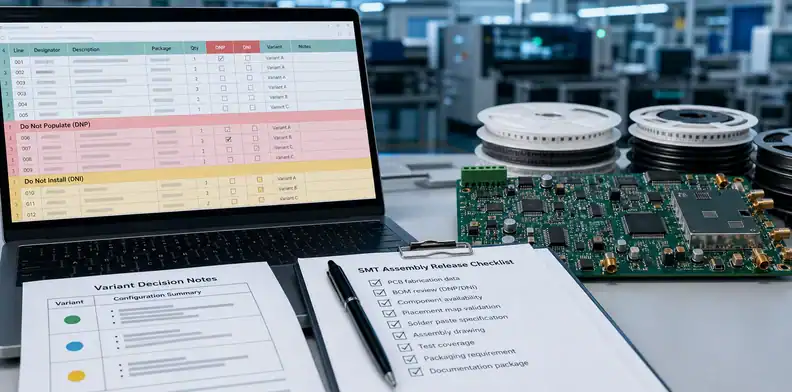
Use BOM for PCB assembly as the base structure, then add a clear status column for variant or placement action. A simple column called “Build Action” is often easier for production than a long note buried in comments.
Useful BOM actions include:
| BOM action | Meaning for the assembler |
|---|---|
| Place | Buy or use supplied stock and mount the part |
| DNP / DNI | Do not mount; buying rule still needs to be stated |
| Source only | Buy or receive the part, but do not mount it on this build |
| Customer supplied later | Do not buy; expect buyer-supplied material or later decision |
| Hold for approval | Do not buy or mount until engineering gives written approval |
For a prototype, the buyer may keep several options visible so engineering can compare variants. For a production build, the buyer may freeze one option and remove all ambiguity. Both approaches are valid, but the RFQ must say which approach is being used.
The risk is not only assembly error. Pricing can also become wrong. One supplier may quote all optional parts, another may quote only fitted parts, and a third may exclude source-only spares. The prices will look different because the assumptions are different.
The cleanest RFQ therefore keeps the line visible when it affects the quote, assembly, test, or future repeat order. It can remove the line only when the supplier truly does not need it for this build.
Give each reference designator one action
Each affected reference designator should have one instruction that sourcing, SMT, inspection, and test can all read the same way. A comment such as “optional” is not enough for production.
For example, R18 marked “DNP for prototype” may mean do not buy and do not place. It may also mean buy the part for the kit but leave the pads empty. It may mean the customer will decide after the first test. These are different purchasing and assembly actions.
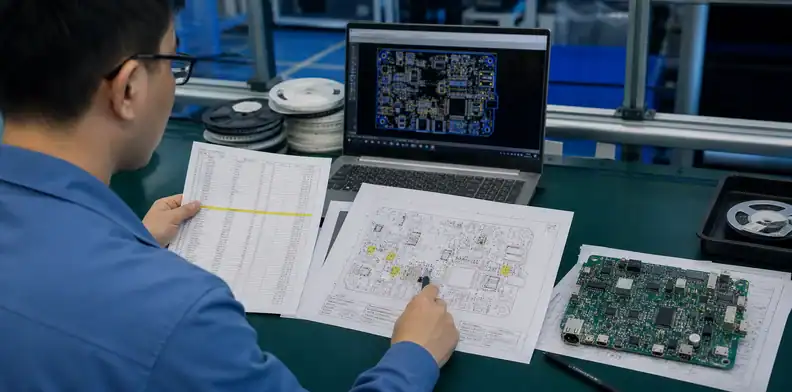
The PCB assembly RFQ files package should include the BOM, centroid file, assembly drawing, and variant notes together. The supplier needs to see whether the BOM instruction matches the placement file and drawing.
Use wording that can be copied into the quote:
“Build Variant A: place all BOM lines marked Place. Do not buy or mount lines marked DNP. Source-only lines should be purchased as loose spares and packed separately. Hold any unclear optional line for buyer approval.”
That wording is plain, but it prevents several common mistakes. It tells purchasing what to buy, SMT what to place, packing what to separate, and engineering when to answer.
Reference designator control is especially useful when several optional parts share one circuit function. A sensor option may use U8, R42, R43, and C19 together. If only one part is marked clearly, the assembler may leave an incomplete circuit or quote a mixed configuration.
For grouped options, add a variant name:
| Variant note | Production meaning |
|---|---|
| Variant A – basic | Leave sensor option unpopulated |
| Variant B – sensor enabled | Place U8, R42, R43, C19 |
| Debug build only | Place connector J7 for test access |
| Production build | DNP debug connector and source zero spares |
The supplier should not have to rebuild the product logic from schematic history. The RFQ should turn the design intent into build instructions.
Separate buying from placement
DNP means the part is not mounted on the board, but it does not always say whether the assembler should buy the part. Buying and placement must be separated in the quote package.
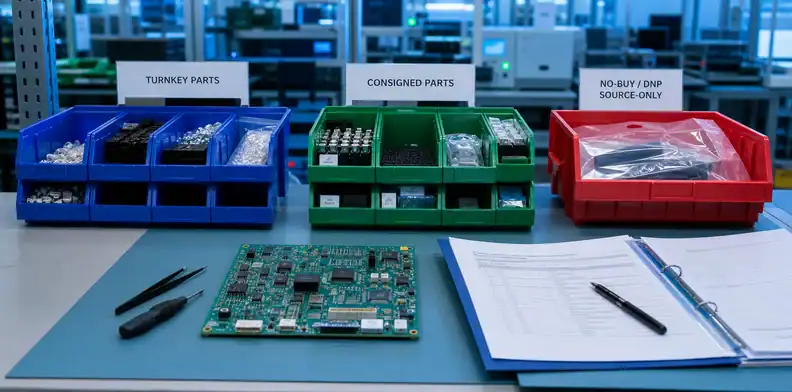
This matters in turnkey, consigned, and mixed-supply assembly. In turnkey work, the assembler may buy components. In consigned work, the buyer may send parts. In mixed work, the assembler buys some lines and receives others from the customer. DNP/DNI lines can sit in any of those models.
When the assembly model is unclear, use turnkey vs consigned PCB assembly before releasing the quote. It helps define who owns each component line.
Also connect optional or unused stock to consigned PCBA parts attrition when customer-supplied kits include parts that will not be placed. Otherwise, receiving may treat those parts as surplus, shortage, or scrap.
Practical examples:
- A debug connector is DNP and should not be purchased.
- A jumper is DNP on the board but should be packed loose for field configuration.
- A shield is DNP for prototype but should be quoted for production volume.
- A customer-supplied module is not mounted in this build but should be counted and returned.
- A part is DNP until firmware testing confirms the final configuration.
Those examples all look similar if the BOM only says DNP. They become clear only when the RFQ separates source, place, pack, return, and hold actions.
A buyer can add these columns:
| Column | What it controls |
|---|---|
| Place? | Whether SMT mounts the part |
| Source? | Whether the assembler buys or expects the part |
| Supplied by | Turnkey, consigned, customer, or not required |
| Pack separately? | Whether unused parts return with the shipment |
| Approval owner | Who answers before sourcing or placement changes |
That structure makes the quote easier to compare. It also protects the supplier. The assembler can price only the work requested instead of absorbing the cost of unclear options.
Check test, firmware, and configuration impact
DNP and DNI choices can change programming, functional test, calibration, current consumption, regulatory behavior, and product configuration. Engineering should review any no-load line that affects how the PCBA will be tested or used.
A debug connector may be DNP for the final product but needed for firmware programming. A zero-ohm resistor may select voltage, boot mode, communication address, or sensor option. A missing pull-up may be correct for one firmware branch and wrong for another. These are not cosmetic BOM details; they decide whether the board can be tested.
When allowed component alternates are involved, keep that decision separate from no-populate instructions. The PCBA approved alternates process should say which fitted parts may change. DNP/DNI status should say which references are not fitted for this build.
Use this review before quote release:
| DNP/DNI area | What engineering should confirm |
|---|---|
| Programming connector | Is it needed before shipment or only for debug? |
| Configuration jumper | Which product mode should the assembled board use? |
| Sensor or RF option | Does the firmware expect the part to be present? |
| Shield, filter, or EMI part | Does validation depend on fitted or non-fitted state? |
| Test point or fixture pad | Does functional test still have access? |
Test teams should also receive the final build variant. If a board is intentionally missing a part, the tester should not mark it as a placement defect. If a firmware file expects the part, the test may fail even though assembly followed the BOM.
The RFQ should make this visible:
“Variant A: J7 DNP for shipment; J7 required only for engineering debug. R52 placed for production firmware mode. Functional test should use production firmware profile A.”
That kind of note saves far more time than a generic “DNP per BOM” comment.
Release one quoted variant to the supplier
Before the quote becomes a PO, the buyer should release one quoted build variant. The supplier can still support multiple variants, but each quote line should say exactly which variant it prices.
A quote for “the PCBA” is weak when the BOM contains several optional populations. The quote should say Variant A prototype, Variant B production, customer-supplied kit, debug connector fitted, sensor option omitted, or whatever combination is actually being ordered.
The release package should include:
- BOM with DNP/DNI/source/place instructions
- Centroid or pick-and-place file
- Assembly drawing
- Variant name and BOM revision
- Turnkey, consigned, or mixed sourcing model
- Test and firmware notes affected by optional parts
- Approval owner for unclear or changed lines
For repeat orders, keep the accepted variant note with the purchasing record. Many PCBA mistakes happen when the first build is understood through email, while the reorder uses only a copied BOM and quantity. A short variant note prevents the team from reopening the same decision months later.
For PCBA projects with DNP, DNI, no-load, source-only, or variant confusion, send QueenEMS the BOM, centroid file, assembly drawing, variant name, sourcing model, and test notes. QueenEMS can review the package and return a quote-ready interpretation so the supplier prices and builds the intended configuration.
Before release, run one cross-check between BOM, centroid, and assembly drawing. If the BOM says DNP but the centroid still gives placement coordinates, the assembler may ask for clarification or follow the wrong document. If the assembly drawing shows an option as not fitted but the BOM leaves the line as normal quantity, purchasing may buy material that the board will not use. If the test note expects a debug connector but the BOM marks it DNP, the first programmed board may fail test for a documentation reason rather than an assembly defect.
A practical RFQ note can be short: “Quote Variant A only. Lines marked DNP are not to be purchased or placed unless the BOM column says source-only. Source-only parts should be packed separately. Any conflict between BOM, centroid, and assembly drawing should be held for buyer approval before SMT.” That wording gives the supplier a build rule, not just an abbreviation.
For small prototype lots, this check also prevents false defect reports. A missing part should not be called an assembly error when the BOM intentionally marked it DNP. The inspection record should compare the finished PCBA against the released variant, not against every footprint on the PCB.
Mark DNP parts differently from sourcing alternates
A DNP or DNI line says the part should not be placed for a specific build. It is not the same as an alternate part, source-only note, or purchasing shortage. Mixing those meanings makes the supplier guess whether to buy, omit, substitute, or hold the line.
A clean RFQ separates placement intent from sourcing intent. That gives the assembler a buildable BOM and gives the buyer a clearer cost comparison between variants.
- DNP/DNI: do not place this reference designator
- Alternate: approved part may replace the primary MPN
- Customer supply: buyer provides the part
- Hold: do not buy until buyer confirms
Freeze the quote BOM before parts are purchased
Before purchasing starts, the buyer should freeze the BOM variant that the supplier quoted. Late DNP changes can change price, kitting effort, test coverage, firmware behavior, and delivery timing even when the PCB itself does not change.
The safest approval record names the exact BOM file, revision, date, quote number, and unresolved lines. That record prevents the supplier from buying parts from one variant and assembling another.
- Quoted BOM filename and revision
- Variant name or configuration
- DNP/DNI lines confirmed by reference designator
- Open lines that remain on hold
FAQ
Should DNP parts stay in the PCBA BOM?
Yes when they explain variants, test options, future-fit locations, debug circuits, or no-load design intent. They can be removed only when the assembler does not need them for sourcing, placement, inspection, test, or repeat-order control.
Does DNP mean the assembler should not buy the part?
Not automatically. DNP normally means do not populate, but the RFQ still needs a sourcing instruction: do not buy, source only, pack loose, customer supplied, or hold for approval.
What is the difference between DNP and DNI?
In many teams they both mean do not populate or do not install. For a supplier, the abbreviation matters less than the action tied to each reference designator.
Can one BOM include several DNP variants?
Yes, but the RFQ should name the exact variant being quoted. If several variants are needed, give each one its own build name, quantity, placement rule, and sourcing rule.
What should QueenEMS review in a DNP/DNI BOM?
Send the BOM, variant name, centroid file, assembly drawing, sourcing model, consigned-kit details, and test or firmware notes. QueenEMS can help turn DNP/DNI lines into clear quote and assembly instructions.
Sources
- Altium DNP/DNI practices – design-output discussion of DNI/DNP designations and build variants.
Send QueenEMS a quote-ready BOM package
If your PCB or PCBA project has a build variant tied to PCBA BOM DNP DNI parts, send QueenEMS the BOM with DNP/DNI lines, centroid file, assembly drawing, variant name, sourcing model, consigned-kit notes, firmware or test assumptions, and the approval owner for unclear lines. We can help review the BOM interpretation, sourcing and placement rules, variant boundary, and PCBA release notes before the supplier quotes or builds the wrong configuration.
Written by the QueenEMS Engineering Team
Upload your files today · Free DFM check before production · Ship worldwide
Get your PCB prototypes in as fast as 24 hours. We handle FR4, Rogers, and Flex up to 60 layers — free prototypes for 2–4 layer boards, no minimum order.
Just upload your Gerber + BOM — we source every part, assemble, and inspect (AOI + X‑Ray) so you don't have to chase suppliers. Boards ship in as fast as 24 hours.