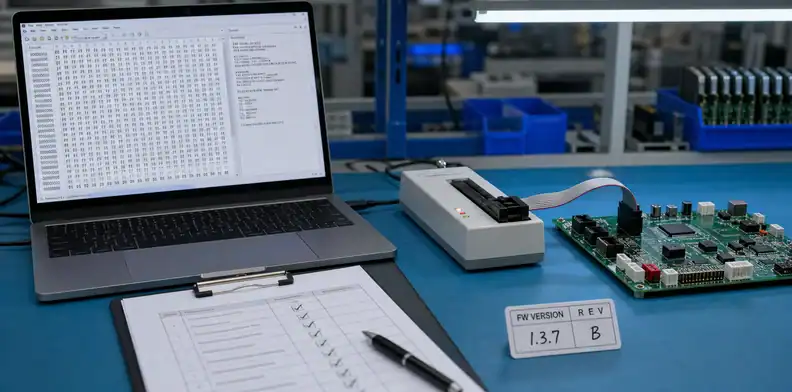
Quick Answer: PCBA firmware programming file release should include the exact production file, target hardware revision, target IC or memory device, version, checksum or hash, programming interface, security or lock-bit rule, serialization plan, and test evidence. The assembler should not program production boards from a casual email attachment unless the release package proves which file is active and how each programmed unit will be verified.
Key takeaways
- Use PCBA firmware programming file release to control the file loaded into production boards, not just to send “the latest firmware.”
- Define programming method, fixture, security, serialization, and test evidence before the supplier quotes the work.
- Treat every late firmware change as a production change that may require reprogramming, retesting, label update, or shipment hold.
Firmware often arrives late because software keeps changing while hardware is being prepared. That is normal during development, but manufacturing needs a frozen release package. A PCBA can be assembled perfectly and still fail shipment if the wrong binary, target device, lock-bit setting, serial number rule, or test script is used.
The buyer does not need to turn the PCBA supplier into a software development team. The supplier needs a clear production instruction: which file to load, how to load it, how to prove success, and what to do if the file changes.
This article focuses on the release package before quotation or production, not on how to write firmware.
Table of Contents
- Release the exact file, not the latest email
- Define where and how programming happens
- Control security, serialization, and configuration
- Connect programming to test evidence
- Handle firmware changes before shipment
- Control firmware revision and checksum evidence
- Decide who owns programming failure recovery
Release the exact file, not the latest email
The programming package should identify the exact production image. A file named final.hex, new.bin, or customer_latest.zip is not enough for PCBA production.
The supplier should receive file name, version, date, target board revision, target IC or memory device, checksum or hash, programming owner, and release approval. This protects both sides. The buyer knows what was loaded, and the assembler can reject later informal files unless the change is approved.
Use the IC programming and testing service context when programming is part of the assembly scope rather than a customer-side step after delivery.
The release line can be simple:
“Program file
Controller_A_FW_1.3.7.hexto U3 on PCB Rev B. Verify checksumxxxx. Do not use later email attachments unless buyer issues a revised release note.”
That is much clearer than “please use latest firmware.” It tells production which file is active and tells purchasing what is included in the quote.
The release package should include:
| File-release item | Why the supplier needs it |
|---|---|
| Production file name | Prevents use of old or informal files |
| Firmware version | Connects the build to the buyer’s release record |
| Target board revision | Avoids loading firmware for the wrong hardware |
| Target IC or memory device | Confirms where the file is programmed |
| Checksum or hash | Verifies the loaded file matches the released image |
| Approval owner | Defines who can release a change |
Most production orders do not need source code. They usually need the released binary, hex file, configuration file, or programming image. If source code, keys, or special tools must be shared, protect that transfer separately and state who may access, store, or delete it.
This is also a quote issue. Programming time, fixture needs, verification logs, serialization, and failed-unit handling may all affect price and lead time. The supplier cannot price those tasks accurately if the firmware release is only an attachment without instructions.
Define where and how programming happens
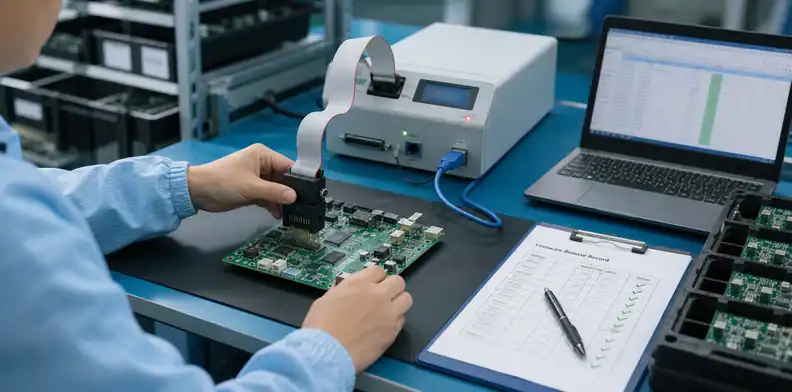
The RFQ should state whether programming happens before placement, after assembly through an interface, through a fixture, or during final functional test. Each method changes process time, tooling, test access, and failure recovery.
Pre-programmed ICs may be purchased already loaded or programmed before SMT. In-circuit programming may use SWD, JTAG, UART, USB, pogo pins, a connector, or a custom fixture. Final-test programming may combine firmware load, functional check, label printing, and serial-number recording.
When fixture assets are involved, connect the release to PCBA test fixture ownership. The RFQ should say who supplies the fixture, who owns the adapter, who maintains the script, and what happens if the fixture fails during production.
Practical programming choices:
| Programming method | What the RFQ should clarify |
|---|---|
| Pre-programmed IC | Who programs or buys the IC, and how incoming parts are verified |
| In-circuit programming | Interface, access pads or connector, power condition, and cycle time |
| Fixture programming | Fixture ownership, NRE, maintenance, and failed-unit handling |
| Final-test programming | Test script, pass/fail record, labels, and shipment evidence |
Do not let the supplier infer this from the board alone. A PCB may have pads that look like a programming interface, but those pads may be for engineering debug, boundary scan, calibration, or a discontinued option.
The buyer should also say what happens when programming fails. Can the supplier reprogram once? Should failed boards be held? Should the buyer receive logs? Should the supplier separate programming failure from assembly failure? These answers affect cost and lead time.
Useful RFQ wording:
“Program after assembly through SWD pads using buyer-provided fixture. Supplier should record pass/fail result and hold any board that fails programming twice.”
This gives the assembler a process, a boundary, and a failure rule.
Control security, serialization, and configuration
Firmware release is not only the file. Security bits, lock settings, serial numbers, MAC addresses, calibration data, bootloader selection, option bytes, and product configuration can decide whether the shipped PCBA works.
A board may boot with the correct binary but still fail if lock bits are wrong, a serial number is duplicated, a MAC address is missing, calibration is not loaded, or a product mode jumper does not match the firmware branch.
Use PCB design IP protection when source files, binaries, keys, programming tools, or customer data need access control. The RFQ should separate what the supplier receives, what the supplier may store, and what must be returned or deleted.
The release should cover:
- Readout protection or lock-bit rule
- Bootloader or fuse settings
- Serial number, MAC address, or unique ID allocation
- Calibration file or customer configuration data
- Label or QR code link to the programmed identity
- Who owns the master list after shipment
Serialization deserves special care. If the buyer provides a serial-number range, the supplier should know whether numbers are assigned before programming, during test, or at packing. If a board fails, the RFQ should say whether the serial number can be reused or must be retired.
Security rules should be practical, not vague. “Protect firmware” can mean many things. A better instruction says whether readout protection is enabled, whether debug access remains open, whether keys are loaded, and whether the supplier may keep a copy of the file after the order ships.
For a small prototype, the buyer may keep security loose so engineering can debug returns. For production, the buyer may lock devices and request a programming log. Both choices are valid, but the supplier needs the rule before programming starts.
Connect programming to test evidence
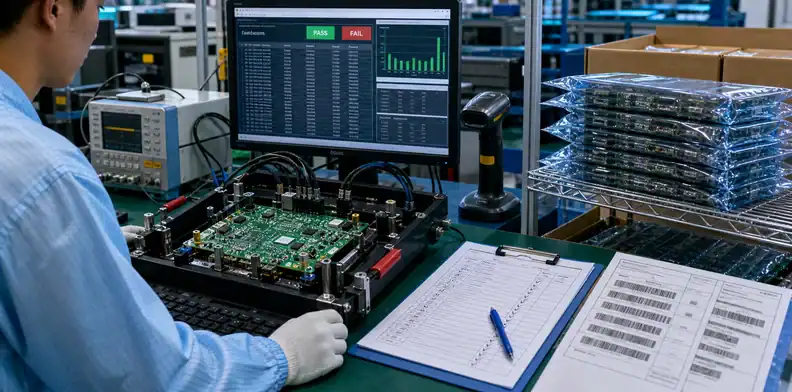
Programming is not complete until the supplier can prove the file was loaded correctly or the assembled board passed the agreed test. A programmer message alone may not prove the product works.
A checksum log can prove the file image. A functional test can prove the board boots, communicates, reads sensors, drives outputs, or enters the correct product mode. Some products need both.
Use the PCB assembly RFQ files package to keep firmware file, fixture note, test procedure, acceptance criteria, and report requirement together.
Choose evidence based on risk:
| Evidence | When it is useful |
|---|---|
| Checksum or hash verification | Confirms the programmed image matches the release |
| Programmer log | Shows programming pass/fail per board or batch |
| Serial-number report | Supports traceability and customer records |
| Functional test result | Proves board behavior after programming |
| Calibration record | Supports products with measured outputs or sensors |
| Label/packing match | Confirms the right programmed unit ships to the right order |
A low-risk prototype may need only a small sample check. A production PCBA with serialization, customer keys, or calibration needs a stronger record. The buyer should choose the evidence before the quote, not after boards are packed.
The receiving team also needs to know what to expect. If the shipment should include a serial-number report or pass/fail log, that requirement belongs in the RFQ and packing instructions. Otherwise, the supplier may ship good boards without the documentation the buyer needs for release.
Good RFQ wording:
“Provide programming pass/fail log with firmware version, board serial number, and functional test result. Hold any unit that fails final test after programming.”
That sentence tells the supplier what success means.
Handle firmware changes before shipment
A firmware change after production release should trigger a controlled decision. The buyer should decide whether already-built boards need reprogramming, retesting, relabeling, repacking, or shipment hold.
Late changes are common. A bug is fixed, a configuration value changes, a customer asks for another mode, or engineering releases a new build after assembly has started. The problem is not the change itself. The problem is treating the change like a casual attachment.
Tie the release to PCBA manufacturing process so programming and test are treated as real production steps.
The change decision should answer:
- Which firmware version was already programmed?
- How many boards are affected?
- Can they be reprogrammed through the available interface?
- Does reprogramming require retest or recalibration?
- Do labels, packing lists, serial logs, or customer records change?
- Who approves shipment after the change?
For example, changing a UI message before shipment may need only reprogramming and a short functional check. Changing a power-control algorithm may require deeper test. Changing serialization rules may require label and database updates.
The supplier should not guess. Use wording like:
“Firmware Rev 1.3.8 replaces Rev 1.3.7 for all unshipped boards. Reprogram all affected units, rerun final functional test, update firmware version label, and hold failed units for buyer disposition.”
That protects the buyer from mixed firmware in one shipment and protects the supplier from unpaid rework assumptions.
For PCBA projects requiring programming, send QueenEMS the released firmware image, checksum or hash, target hardware revision, target device, programming interface, fixture notes, security rule, serialization plan, and test expectation. QueenEMS can help turn those inputs into a quote-ready programming and assembly release package.
The most useful handoff is a one-page programming release note. It does not need to expose source code or internal development history. It should identify the production image, target device, board revision, programming method, security settings, serial-number rule, test evidence, and change owner. If the supplier can hand that page to a programmer and test technician without another meeting, the release is probably clear enough for quotation.
Example wording: “Program FW_1.3.8.hex to U3 on PCB Rev B through SWD pads after assembly. Enable readout protection level specified in the release note. Assign serial numbers from range QEM-260804-001 to QEM-260804-200. Provide programming pass/fail log and final functional test result. Hold boards if firmware, fixture script, label, or serial-number range changes.”
That wording turns a software file into a manufacturing instruction. It also helps the supplier price programming time, fixture use, retest work, and documentation before the PO is released.
For small prototype builds, the buyer may accept a lighter record, such as file name, checksum, programmer pass result, and sample functional check. For production or serialized units, the record should usually be stronger: firmware version by serial number, test result, label match, and handling rule for failed or reprogrammed units. The point is not to create paperwork; it is to make sure the buyer can prove which firmware left the factory.
The same package should travel with reorders. If the next PO only says “same as last time,” the supplier may not know whether that means the same hardware, same firmware, same serialization range, same test limits, or only the same unit price.
Control firmware revision and checksum evidence
Firmware release should include a stable revision identifier and a way to prove the file used in production. File name alone is weak evidence because teams often resend the same binary with a different name or keep a newer file in an email thread.
For production RFQs, ask for a checksum, version string, or programming log tied to the accepted file. That gives engineering and receiving a practical way to confirm what was loaded if a board later fails test.
- Released file name and revision
- Checksum, version string, or secure file record
- Programming date, lot, and operator or station record
- Rule for replacing the file before shipment
Decide who owns programming failure recovery
The quote should define what happens when programming fails. Some failures are file problems, some are fixture or socket problems, some are device-supply problems, and some are board-level faults. The recovery owner changes depending on the cause.
A good supplier response does not only say ?programming included.? It says what evidence will be reviewed before rework, scrap, replacement devices, or customer engineering support is requested.
- Failure log and sample quantity
- Device, fixture, file, or board-level suspected cause
- Reprogram, replace, hold, or return decision
- Buyer approval needed before irreversible rework
FAQ
Should I send source code to a PCBA supplier?
Usually no. Most production programming needs the released binary, hex file, configuration file, or programming image plus instructions. Send source code only when there is a clear need and access is protected.
Is a checksum necessary for firmware release?
Yes when the buyer needs proof that the loaded file matches the released image. A checksum, hash, or tool verification record reduces confusion when multiple firmware versions exist.
Can firmware be programmed after PCBA assembly?
Yes, if the board has an accessible programming interface, correct power condition, fixture or cable support, and a verified process. The RFQ should price that work explicitly.
What happens if the firmware changes after boards are built?
The buyer should decide whether boards need reprogramming, retesting, relabeling, repacking, or shipment hold. The change should not be handled as an informal email attachment.
What should QueenEMS review before PCBA programming?
Send the firmware image, checksum, target IC, board revision, programming method, fixture notes, security setting, serialization plan, and test requirement. QueenEMS can help clarify what belongs in the quote and production release.
Sources
- Microchip Programming Center – programming service page mentioning device selection and
.hexfile upload as production-programming inputs. - Altium hardware version control – hardware version-control context for keeping design data synchronized.
Send QueenEMS a quote-ready programming package
If your PCB or PCBA project has production programming tied to PCBA firmware programming file release, send QueenEMS the released firmware image, checksum or hash, target board revision, target IC, programming interface, fixture notes, security setting, serialization plan, and test criteria. We can help review programming scope, fixture and test boundaries, IP/security handling, change-control wording, and PCBA quote-ready release notes before production boards are programmed.
Written by the QueenEMS Engineering Team
Upload your files today · Free DFM check before production · Ship worldwide
Get your PCB prototypes in as fast as 24 hours. We handle FR4, Rogers, and Flex up to 60 layers — free prototypes for 2–4 layer boards, no minimum order.
Just upload your Gerber + BOM — we source every part, assemble, and inspect (AOI + X‑Ray) so you don't have to chase suppliers. Boards ship in as fast as 24 hours.