
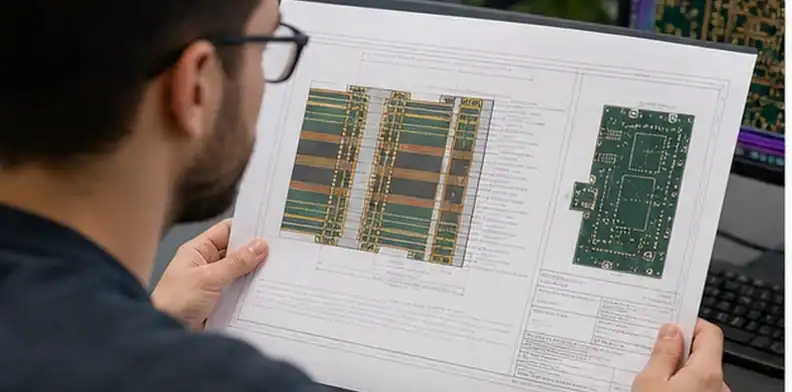
Quick Answer: Decision: hybrid stackup drawing. Controlled object: one controlled layer table naming every copper layer, dielectric, bondply or prepreg, thickness, foil, material grade, note, and change code. Design-owned boundary: layer order, low-loss layer locations, finished thickness, exact or approved materials, controlled impedance references, and drawing precedence. Supplier discretion: supplier proposals shown as a redlined revision rather than applied silently to the production build. Stop rule: Rogers plus FR-4 used as the only material instruction, unnamed bond layers, conflicting dimensions, or no revision owner.
- Keep the page focused on drawing fields, RFQ attachments, and revision control, not material selection theory.
- Use the stackup drawing as the shared file for engineering, purchasing, CAM, and quality.
- Mark which supplier proposals are allowed and which need a drawing revision before CAM.
- Compare quotes by the drawing revision, evidence requirement, and exception list, instead of headline price alone.
The practical question behind a hybrid PCB stackup drawing is whether the fabricator can quote the same board that engineering intended. A short note such as “Rogers plus FR4” or “low-loss hybrid stackup” leaves too much room for different material thicknesses, foil choices, prepreg substitutions, and impedance assumptions.
Table of Contents
- Make the drawing the source of truth
- Name every dielectric and copper layer
- Show which layers need controlled impedance
- Mark supplier-change limits before CAM
- Attach evidence requirements to drawing notes
- Package the RFQ so quotes stay comparable
- Show approved alternates without opening the whole design
- Use the drawing as the supplier question log
- Use RFQ wording that turns the drawing into a controlled file
Make the drawing the source of truth
The first useful step for a hybrid PCB stackup drawing is to make one controlled file own the build intent. The drawing should not be a decorative PDF beside the Gerber package; it should be the place where the supplier sees the approved layer order, material callouts, controlled dimensions, and evidence requirements.
That matters because hybrid construction creates several places where a supplier can make a reasonable but different assumption. A fabricator may choose a stocked prepreg, move a material to another layer, tune dielectric thickness, or propose a copper foil that fits its process window. Those changes may be harmless on one board and unacceptable on another.
The drawing gives purchasing a way to compare quotes without becoming the technical translator. If supplier A quotes to revision B while supplier B quotes to an email note, the two prices are not comparable even when both mention the same material family.
Drawing signal: The quote is controlled only when the supplier can point to the exact stackup drawing revision used for price, lead time, and CAM assumptions.
Name every dielectric and copper layer
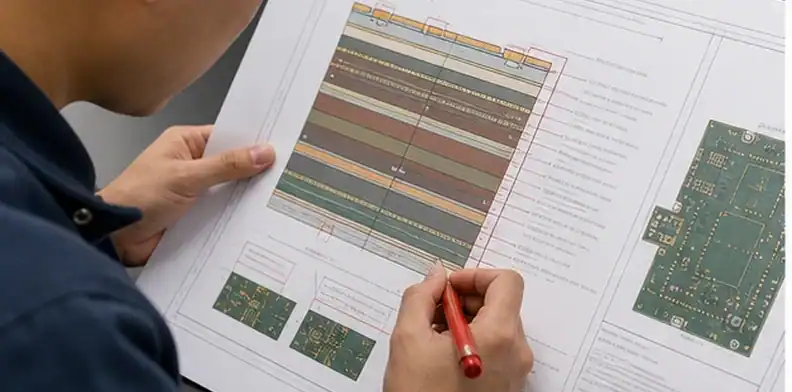
The drawing should name every dielectric and copper layer that affects the quote. “Hybrid stackup” is not enough. The supplier needs to know which layers use low-loss material, which layers use FR4 or another support material, which prepregs are required or allowed, and whether copper weight is start copper or finished copper.
| Drawing field | Why it matters | Buyer check |
|---|---|---|
| Layer order | Controls reference planes and lamination sequence | Does each copper layer have a number and function? |
| Laminate name | Drives material cost, lead time, and electrical behavior | Is the exact grade or approved family shown? |
| Prepreg or bondply | Controls dielectric thickness and resin behavior | Is substitution allowed or approval-only? |
| Copper weight and foil | Changes impedance, loss, plating, and etching margin | Is the note clear before CAM tuning? |
| Finished thickness | Affects connector fit and mechanical stack | Is tolerance stated where it matters? |
This is also where the drawing prevents a common quote dispute. A buyer may think the quote includes a named low-loss core and matching bondply, while the supplier may have priced an available alternate. The difference may not appear until CAM or first article if the drawing does not force the question early.
Material rule: A hybrid PCB stackup drawing should make material choice, thickness, copper, and substitution limits visible before the supplier prices the job.

Show which layers need controlled impedance
A hybrid PCB stackup drawing should show which layer pairs or structures need controlled impedance. Without that note, the fabricator may tune the wrong geometry, quote a generic coupon, or assume that all controlled layers share the same evidence requirement.
The drawing does not need to expose confidential net names when the buyer wants to keep the package lean. It can still identify impedance classes, layer pairs, reference planes, target values, tolerance, and whether the supplier should confirm by calculation, coupon, TDR report, or layout review.
Impedance rule: Do not treat a hybrid drawing as quote-ready until the controlled layer pair and verification method are visible.
Mark supplier-change limits before CAM
A clean note can be short. It may say that impedance trace-width tuning is allowed within the released tolerance, while material family, critical layer assignment, finished thickness, surface finish, and evidence requirements need written approval. That sentence prevents a supplier from solving a yield problem by changing the electrical design without a decision record.
Attach evidence requirements to drawing notes
Proof call: Evidence should be attached to the drawing risk it proves, not requested later as a generic quality favor.
Package the RFQ so quotes stay comparable
| RFQ attachment | Quote problem it prevents | Who should review it |
|---|---|---|
| Released drawing revision | Supplier pricing an old stackup | Engineering and purchasing |
| Approved alternates list | Uncontrolled material substitution | Engineering |
| Evidence note | Missing test or first-lot record | Quality and purchasing |
| Exception log | Hidden CAM changes | Engineering and supplier |
Show approved alternates without opening the whole design
Use the drawing as the supplier question log
Use RFQ wording that turns the drawing into a controlled file
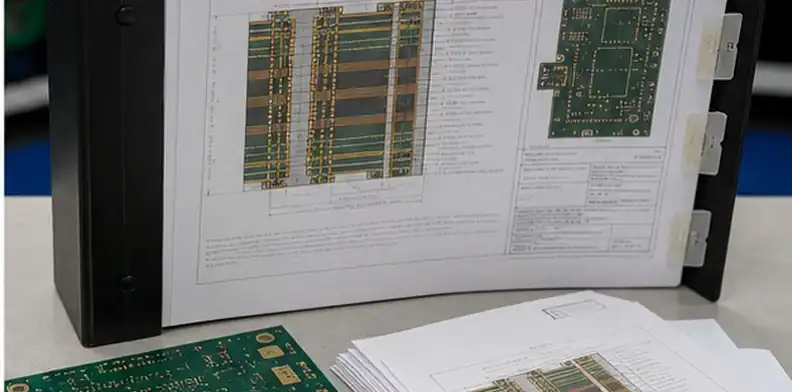
A hybrid PCB stackup drawing is most useful when it becomes a controlled RFQ file, not a reference picture. The drawing should carry revision, layer order, material callouts, dielectric thicknesses, copper weights, finished thickness, impedance targets, and the owner of any change approval.
Practical wording can say: quote only to the attached hybrid PCB stackup drawing revision. Confirm layer order, material and prepreg availability, controlled-impedance layer pairs, finished thickness, copper weights, surface finish, and any deviation required for manufacturability before CAM release.
The RFQ should also define how supplier questions are handled. A supplier may ask to change prepreg, foil, thickness, or coupon structure. Those questions should be answered against the drawing revision, then saved with the quote. If the drawing changes, the quote should show the new revision so the buyer does not approve an old stackup by accident.
This is especially useful when engineering, purchasing, and quality are not in the same location. The drawing gives each role the same object to review: engineering checks electrical and mechanical intent, purchasing checks price and lead time, and quality checks what evidence should arrive with the lot.
Drawing rule: Treat the stackup drawing as the controlled source for quote assumptions and supplier deviations.
For drawing control, add a small revision table outside the fabrication artwork if the CAD tool does not already manage it clearly. The table should state what changed: material family, dielectric thickness, copper weight, impedance layer pair, finished thickness, or evidence requirement. Do not leave those changes buried in an email attachment name.
This is especially useful when a supplier returns a DFM suggestion. The buyer can decide whether the suggestion becomes a new drawing revision, a quote exception, or a rejected alternate. That simple separation keeps the hybrid PCB stackup drawing from drifting while purchasing is still comparing price and lead time.
Production record for the hybrid stackup drawing
Controlled object
Controlled object: one controlled layer table naming every copper layer, dielectric, bondply or prepreg, thickness, foil, material grade, note, and change code.
Failure boundary
Failure boundary: quotes using different constructions, hidden substitutes, missing dielectric data, mismatched revisions, or CAM changes that never return to engineering.
Design-owned conditions
Design-owned conditions: layer order, low-loss layer locations, finished thickness, exact or approved materials, controlled impedance references, and drawing precedence.
Supplier discretion
Supplier discretion: supplier proposals shown as a redlined revision rather than applied silently to the production build.
Required proof
Required proof: signed drawing, exception table, material availability confirmation, and a final construction record tied to the released dataset.
Production stop
Production stop: Rogers plus FR-4 used as the only material instruction, unnamed bond layers, conflicting dimensions, or no revision owner.
Repeat-order baseline
Repeat-order baseline: approved layer table, exceptions, alternate list, signature, quote revision, and final as-built construction for the first lot.
RFQ inputs
RFQ inputs: schematic and layout constraints, current layer plan, material grades, target thickness, impedance table, assembly exposure, quantities, and alternate policy.
FAQ
Can the supplier decide the hybrid stackup drawing?
Discretion for hybrid stackup drawing: supplier proposals shown as a redlined revision rather than applied silently to the production build. Engineering control for hybrid stackup drawing: layer order, low-loss layer locations, finished thickness, exact or approved materials, controlled impedance references, and drawing precedence.
What stops this hybrid stackup drawing?
Stop rule for hybrid stackup drawing: Rogers plus FR-4 used as the only material instruction, unnamed bond layers, conflicting dimensions, or no revision owner. Disposition owner for hybrid stackup drawing: the named engineering approver.
Which proof closes the hybrid stackup drawing?
Evidence for hybrid stackup drawing: signed drawing, exception table, material availability confirmation, and a final construction record tied to the released dataset. Revision link for hybrid stackup drawing: the quoted dataset.
What survives into the next order?
Reorder baseline for hybrid stackup drawing: approved layer table, exceptions, alternate list, signature, quote revision, and final as-built construction for the first lot.
For a focused hybrid stackup drawing, send QueenEMS schematic and layout constraints, current layer plan, material grades, target thickness, impedance table, assembly exposure, quantities, and alternate policy. Redline request: hybrid stackup drawing. Open assumptions: hybrid stackup drawing. Approver: hybrid stackup drawing owner.
Written by the QueenEMS Engineering Team
Sources
Upload your files today · Free DFM check before production · Ship worldwide
Get your PCB prototypes in as fast as 24 hours. We handle FR4, Rogers, and Flex up to 60 layers — free prototypes for 2–4 layer boards, no minimum order.
Just upload your Gerber + BOM — we source every part, assemble, and inspect (AOI + X‑Ray) so you don't have to chase suppliers. Boards ship in as fast as 24 hours.