
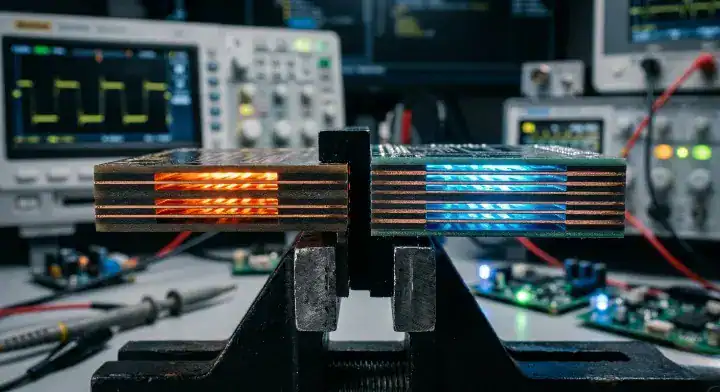
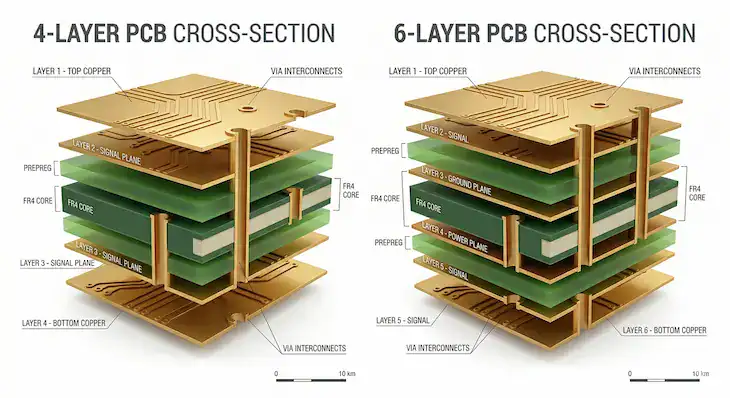
A 4-layer PCB gives you two outer routing layers and two inner planes; a 6-layer PCB adds two more layers, which you can use for routing, for a second ground plane, or for both. The extra layers cost more per board, but they let every high-speed signal layer sit next to a solid reference plane, give dense BGAs more escape channels, and make EMI easier to control. This guide compares the common stackups for each, explains what changes in cost and lead time, and lists the design signs that tell you it is time to move from 4 to 6 layers.
1. What Is the Difference Between a 4-Layer and a 6-Layer PCB?
The number of copper layers, and therefore how many layers can carry signals and how many can be solid planes. Both are usually built to the same finished thickness, most often 1.6 mm (0.062 in); the 6-layer board simply uses thinner cores and prepreg between layers.
| 4-layer PCB | 6-layer PCB | |
|---|---|---|
| Copper layers | 4 | 6 |
| Typical use of layers | 2 signal, 1 ground, 1 power | 3–4 signal, 1–2 ground, 1 power |
| Signal layers next to a solid plane | Usually the two outer layers | All signal layers, in a good stackup |
| Routing room for BGAs | Limited | Two extra layers for escape routing |
| Design standard | IPC-2221 with IPC-2222, Type 3 (multilayer, no blind or buried vias) | Same |
IPC-2222B classifies rigid boards by construction: Type 3 is a multilayer board without blind or buried vias, and Type 4 is a multilayer board with them (IPC-2222B scope). Most 4- and 6-layer boards are Type 3, which keeps them on the standard, lower-cost process.
2. What Are the Common 4-Layer and 6-Layer Stackups?
There is no single correct stackup, but a few orders come up again and again. Texas Instruments’ high-speed layout guide compares them for signal integrity (SI) and EMC in its own application examples (TI SLLA414A, section 4.12):
| Stackup (top to bottom) | Layers | TI’s rating for EMC | TI’s rating for SI |
|---|---|---|---|
| Signal / Ground / Power / Signal | 4 | Bad | Not rated good |
| Signal / Ground / Signal / Power | 4 | Bad | Good |
| Signal / Ground / Power / Signal / Ground / Signal | 6 | Good | Good |
| Signal / Ground / Power / Ground / (unused) / Signal | 6 | Good | Good |
| Signal / Signal / Power / Ground / Signal / Signal | 6 | Bad | Bad |
S = signal, G = ground, P = power. TI rates these for its signal-conditioner and USB hub layouts and recommends at least 6 layers for those high-speed interfaces. It is an example, not a rule that every 4-layer board fails EMC.
What the table shows is the principle behind the choice: a signal layer that sits right next to a solid ground plane has a short, predictable return path. In the common 4-layer order (S/G/P/S), the bottom signal layer references the power plane instead, and the power and ground planes are separated by the thick center core. A 6-layer stackup such as S/G/P/S/G/S fixes both: each signal layer has an adjacent plane, and the board has two ground planes.
For 2-layer boards and the step up to 4 layers, see our 2-layer vs 4-layer PCB comparison, and for building a stackup in detail, our PCB stack-up design guide.
3. When Is a 4-Layer Board Enough?
When the board has few fast edges, no fine-pitch BGAs and no sensitive analog section next to switching power. Typical examples:
- Microcontroller boards, sensors, IoT nodes and simple control boards.
- Designs with one or two moderate-speed interfaces that can be routed on the top layer over the ground plane.
- Cost-sensitive volume products where routing fits comfortably and EMC margin has been confirmed.
Keep the four layers working well: put fast signals on the layer next to ground, keep the ground plane unbroken under them, and avoid routing high-speed traces across gaps or splits in a plane.
4. When Should You Move to 6 Layers?
When any of these apply:
| Sign | Why 6 layers help |
|---|---|
| High-speed interfaces (USB 3.x, PCIe, DDR memory, fast SerDes) | Every signal layer can sit next to a solid reference plane |
| Fine-pitch BGAs, or several BGAs | Two extra inner layers for escape routing, often avoiding HDI microvias |
| Sensitive analog or RF next to switching regulators | A second ground plane separates noisy and quiet sections without splitting planes |
| Many impedance-controlled nets on several layers | Thin dielectrics next to each plane make controlled impedance easier to hit |
| You are already splitting the ground plane to make routing fit | A split plane under fast signals breaks the return path; extra layers remove the need |
| EMC pre-scan fails on a 4-layer design | Better plane coupling and shielding of inner traces |

Is HDI an alternative to adding layers?
Sometimes, but it is usually the more expensive route. Microvias and via-in-pad move the board to IPC-2222 Type 4 construction (blind or buried vias), which needs extra lamination and drilling steps. When the extra layers give a fine-pitch BGA enough escape room, a standard through-hole 6-layer board is often the cheaper fix; for the finest pitches, where through-holes no longer fit between the pads, HDI is usually unavoidable.
5. How Much More Does a 6-Layer PCB Cost?
There is no fixed percentage. The price difference depends on board size, quantity, material, copper weight, impedance control and finish, and it changes with each quote. What drives the extra cost:
- Material: two more copper layers and extra cores and prepreg.
- Inner-layer processing: one more inner core to image, etch and inspect.
- Lamination and drilling: the same single press cycle for through-hole boards, but a thicker, more complex build to register and drill.
- Testing: controlled-impedance coupons and reports if you require them.
For small prototype quantities the absolute difference is usually modest because setup costs dominate; at volume the per-board difference matters more. The reliable way to compare is to quote both stackups for the same board, size and quantity. If the 6-layer version removes HDI, a failed EMC test or a respin, it is often the cheaper option overall.
6. Do 6-Layer Boards Take Longer to Make?
A little. A standard through-hole 6-layer board is laminated in one press cycle like a 4-layer board; a second lamination is only needed for blind or buried vias. The extra time comes from the additional inner layer and the more complex build. Our reference lead times for bare boards show the difference:
| Order area | 4-layer | 6–8 layer |
|---|---|---|
| Under 1 m² | 5 days | 6 days |
| 1–5 m² | 7 days | 9 days |
| Over 5 m² | 12 days | 12 days |
| Expedited | 24 hours | 36 hours |
These are reference times for standard bare boards; the confirmed lead time depends on material and specification and is given with each quote; see our guide to PCB fabrication lead time for what else affects it.

7. What Should You Specify When Ordering a 4- or 6-Layer Board?
So the fabricator builds the stackup you designed, or proposes a better one:
| Item | What to write |
|---|---|
| Layer count and order | E.g. “6 layers: S / G / P / S / G / S” |
| Finished thickness and tolerance | E.g. 1.6 mm ± 10% |
| Dielectric thicknesses | Per layer pair, or “fabricator to propose for approval” |
| Material | FR-4 grade and Tg, or a specific laminate |
| Copper weights | Outer and inner layers |
| Controlled impedance | Target values, tolerance, reference layers, and whether you need a test report |
| Via types | Through-hole only, or blind/buried (changes the build) |
| IPC class | Class 2 or Class 3 |
How Can We Help?
We build multilayer PCBs from 1 to 40 layers. Send your Gerber files and stackup and we will return a bare-board quote within 2 hours, with both 4- and 6-layer options if you are deciding. New customers get 2–4 layer FR-4 prototypes free, and our free DFM check flags stackup and impedance issues before fabrication. See the layer counts, materials and finishes we build in our PCB fabrication overview.
Conclusion
Choose 4 layers when the design is simple enough that every fast signal can run next to an unbroken ground plane. Move to 6 layers when you have high-speed interfaces, fine-pitch BGAs, sensitive analog next to switching power, or when you are splitting planes to make routing fit: a stackup such as S/G/P/S/G/S gives every signal layer a reference plane and two ground planes. The cost difference depends on the board and quantity, so quote both options. Contact us with your files for a bare-board quote within 2 hours.
FAQ
How thick is a standard 4-layer PCB? The most common finished thickness is 1.6 mm (0.062 in), the same as most 2- and 6-layer boards. Other thicknesses are available; the dielectric layers change to fit.
Is a 6-layer board thicker than a 4-layer board? Not necessarily. Both are usually ordered at 1.6 mm; the 6-layer board uses thinner dielectrics between layers.
Can DDR memory be routed on a 4-layer board? Some lower-speed designs do it, but it is difficult: memory interfaces need controlled impedance, length matching and continuous reference planes. Follow the routing guide for your processor; many recommend 6 or more layers.
Why do PCBs have an even number of layers? Boards are built from double-sided cores, and an even, symmetrical build balances copper and resin on both sides of the center, which helps keep the board flat during lamination and soldering.
How many layers can a PCB have? Standard builds range from 1 to dozens of layers; we build 1 to 40 layers.
Upload your files today · Free DFM check before production · Ship worldwide
Get your PCB prototypes in as fast as 24 hours. We handle FR4, Rogers, and hybrid boards up to 40 layers in volume production, with advanced builds subject to engineering review — free prototypes for 2–4 layer FR-4 boards, no minimum order.
Just upload your Gerber + BOM — we source every part, assemble, and inspect (AOI + X‑Ray) so you don't have to chase suppliers. Boards ship in as fast as 24 hours.