
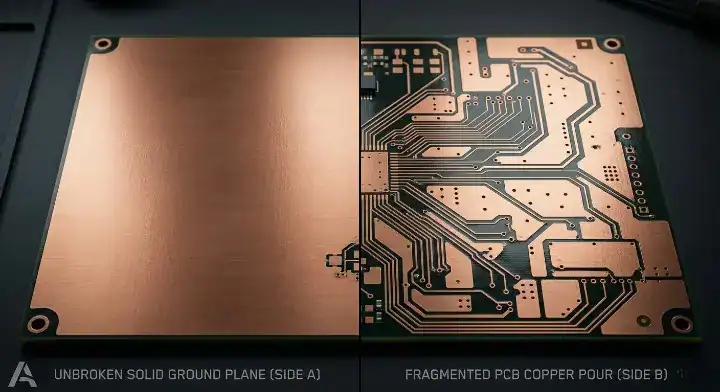
Quick Answer: A pcb copper pour fills unused board area with copper connected to ground, but it is not a substitute for a solid ground plane — and poorly executed copper pour can actually make EMI worse. A solid ground plane on a dedicated layer provides a continuous, low-impedance return path for all signals. Copper pour on signal layers only helps when stitching vias are placed at intervals less than 1/10 of the wavelength at your highest operating frequency (under 15mm for 1GHz signals in FR4). Any copper island not connected to ground through stitching vias becomes a floating antenna that increases radiated EMI. For designs with signals above 100MHz or EMC certification requirements, a 4-layer stackup with a dedicated ground plane layer is more effective than relying on a copper pour on a 2-layer board.
Key takeaways:
- Copper pour ≠ ground plane — its effectiveness depends entirely on stitching via density.
- Stitching via spacing must be less than lambda/10 at your highest frequency (≤15mm at 1GHz).
- Floating copper islands with no ground connection act as antennas and worsen EMI.
- Splitting your ground plane for analog/digital is outdated advice — a single continuous plane is almost always better.
- For signals above 100MHz: a 4-layer board with a solid ground plane outperforms copper pour on a 2-layer board.
- Always audit and delete isolated copper islands after running the pour command in your CAD tool.
Table of Contents
- What Is the Difference Between a Ground Plane and PCB Copper Pour?
- When Is Copper Pour Genuinely Useful — and When Is It Just Visual Noise?
- Does Copper Pour on a 2-Layer Board Actually Help EMI — or Make It Worse?
- Should You Split Your Ground Plane for Analog and Digital Circuits?
- What Happens When You Leave Floating Copper on Your PCB?
- The Ground Plane Decision Guide: 2-Layer vs 4-Layer, Copper Pour vs Solid Plane
You just failed your EMC certification testing, and the lab report shows massive radiated emissions from your new 2-layer design. You diligently applied a pcb copper pour to every empty space on the board to improve your grounding, so why is it failing? After processing 3,200+ assembly orders and running DFM checks last year, we see hardware engineers accidentally build floating antennas out of poorly stitched copper islands every single week. Fixing this at the layout stage takes 30 minutes, while failing EMC testing costs thousands of dollars. Here is exactly how to manage your ground routing so you pass emissions testing without overspending on unnecessary board layers.
What Is the Difference Between a Ground Plane and PCB Copper Pour?
A solid ground plane is a dedicated internal layer entirely covered in copper that provides a continuous, low-impedance return path, whereas a pcb copper pour simply fills the empty spaces on a routing layer with copper polygons. A true ground plane guarantees high-frequency return currents flow directly underneath their signal traces, while a copper pour forces currents to detour around components and vias, massively increasing your loop area.
High-frequency signal return currents do not take the path of least resistance. They take the path of least inductance. Physics dictates that this path is directly beneath the signal trace. When you use a solid ground plane, the return current mirrors the signal perfectly. When you use a copper pour, the routing gaps and via clearances break that mirror. The return current has to find a detour around the gap, creating a physical loop that radiates electromagnetic interference (EMI).
The factory floor reality is… many designers treat these two concepts as identical. We constantly receive Gerber files where engineers expect a heavily broken top-layer pour to perform like a solid reference plane. This misunderstanding directly impacts signal integrity. To fully grasp how return paths dictate trace dimensions, review our PCB trace width and spacing guide before running your routing rules.
To clarify the physical differences in your CAD tool:
- A solid plane is a negative layer in manufacturing (you draw the clearances).
- A pour is a positive layer (you draw the copper).
- A solid plane provides absolute unbroken continuity across the entire board.
- A pour is naturally fragmented by every trace and pad on that layer.
When Is Copper Pour Genuinely Useful — and When Is It Just Visual Noise?
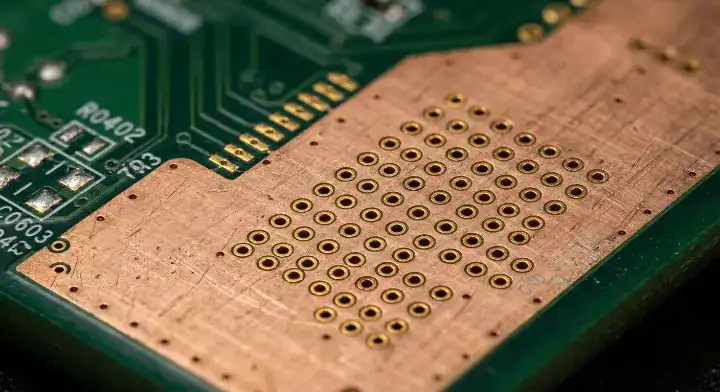
Copper pour is genuinely useful for balancing thermal distribution to prevent reflow warping, providing extra heat dissipation paths for power components, and increasing decoupling capacitance when heavily stitched with vias. It becomes harmful visual noise—and an EMI hazard—when it creates isolated copper islands without ground via connections, or when it is placed directly under sensitive analog signals where it adds parasitic capacitance.
We see this specific debate on engineering forums constantly: “I always fill unused copper with GND pour by default. Is this actually helping my design, or is it just something people do out of habit?” Filling empty space is highly beneficial if executed correctly. From a manufacturing perspective, a board with 80% copper on the top layer and 20% on the bottom will bend like a potato chip during the high-heat SMT reflow process due to mismatched thermal expansion rates. Adding copper pour balances the physical structure. You can read more about this mechanical failure mode in our guide on PCB warping causes and prevention.
Pull back the curtain on this… while it fixes mechanical issues, a default pour command in your CAD software often destroys your RF performance. If your software fills an area inside a Wi-Fi antenna’s keep-out zone, it will drastically detune the antenna. If it fills an area under a high-impedance analog sensor line, it increases parasitic capacitance and degrades the signal. You cannot just click “pour all” and send it to fabrication.
| Scenario | Copper Pour Function | Engineering Conclusion |
|---|---|---|
| Blank exterior areas, dense stitching vias | Increases equivalent decoupling capacitance, shields EMI. | Genuinely Useful ✅ (Standard practice) |
| Heavily unbalanced copper distribution | Balances copper area, prevents reflow warping. | Genuinely Useful ✅ (Mechanical stability) |
| Near power components, tied to thermal pads | Adds thermal dissipation paths, lowers thermal resistance. | Genuinely Useful ✅ (Thermal management) |
| Insufficient stitching vias, isolated islands | Becomes a floating antenna, increases radiated EMI. | Harmful ❌ (Must delete immediately) |
| Inside RF antenna keep-out zones | Alters antenna radiation pattern, kills efficiency. | Harmful ❌ (Strict keep-out required) |
| Directly under sensitive analog traces | Adds parasitic trace capacitance, ruins signal integrity. | Harmful ❌ (Requires targeted clear-out) |
| Under traces crossing a split ground plane | Fails to provide a continuous return path, massive EMI. | Harmful ❌ (Avoid splitting planes) |
Does Copper Pour on a 2-Layer Board Actually Help EMI — or Make It Worse?
Placing a pcb copper pour on a 2-layer board will drastically worsen your EMI if the stitching via spacing is larger than 1/10 of the signal wavelength, causing the copper to act as a resonating antenna. To actually improve EMI on a 2-layer design, you must place stitching vias every 15mm for a 100MHz signal and aggressively delete all isolated dead copper.
A frustrated designer recently posted this exact scenario: “I filled both layers of my 2-layer board with copper pour connected to GND. I thought this would improve EMI, but I failed EMC testing. What went wrong?” The failure happened because the pour clearances forced the return currents to take massive detours, and the pour itself wasn’t stitched tightly enough. When you have two parallel copper pours on the top and bottom layers, they do not act as a ground shield unless they are physically tied together at extremely tight intervals.
Here’s where it gets real… stitching via density is a strict mathematical requirement, not a visual preference. The gap between your ground vias must be smaller than the wavelength of your highest operating frequency. If the gap is too large, the electromagnetic wave slips right through, and the copper edges begin to radiate that energy outward.
| Highest Operating Frequency | Lambda (Wavelength in FR4) | Recommended Via Spacing (lambda/10) | Strict Spacing Rule (lambda/20) |
|---|---|---|---|
| 100 MHz | ~1500 mm | < 150 mm | < 75 mm |
| 500 MHz | ~300 mm | < 30 mm | < 15 mm |
| 1 GHz | ~150 mm | < 15 mm | < 8 mm |
| 2.4 GHz (WiFi/BT) | ~62 mm | < 6 mm | < 3 mm |
| 5 GHz (WiFi) | ~30 mm | < 3 mm | < 1.5 mm |
(Note: The effective wavelength in FR4 is approximately 49% of the free-space wavelength due to the dielectric constant (Dk ~4.2). The numbers above reflect this FR4 correction based on standard manufacturing parameters.)
If your design operates above 100MHz, trying to patch a 2-layer board with dense vias is fighting a losing battle. The physical geometry of a standard 1.6mm thick 2-layer board means the distance between the signal layer and the bottom return pour is huge, creating a massive loop area. Instead of wasting days failing EMC tests, you should review our 2-layer vs 4-layer PCB guide to see exactly when the upgrade cost becomes mandatory.
Should You Split Your Ground Plane for Analog and Digital Circuits?

You should not split your ground plane for analog and digital circuits in modern designs, because forcing return currents to navigate around physical splits creates massive loop areas that severely degrade EMI performance. Instead of a physical split, you should use a single continuous ground plane and carefully partition your layout so analog and digital components sit in isolated zones.
The most controversial topic in hardware design usually sounds like this: “I have a mixed-signal board with both analog and digital circuits. Should I split the ground plane into AGND and DGND?” Twenty years ago, application notes recommended splitting grounds to keep noisy digital currents away from sensitive analog ADC pins. Today, with digital signals switching at incredibly fast edge rates, that advice is destructive.
That said… the physics of fast edge rates changes everything. High-frequency digital return currents naturally want to flow directly beneath their respective signal traces. If you physically cut the ground plane, and a signal trace crosses that cut, the return current hits a literal wall. It has to travel all the way to the edge of the split, find the single bridge connecting AGND and DGND, and travel back. This creates a giant magnetic loop antenna right in the middle of your board.
- Do not split the ground plane.
- Do partition your component placement (Analog chips on the left, Digital on the right).
- Do route analog traces only over the analog zone, and digital traces only over the digital zone.
- The only valid exception for splitting grounds is for high-voltage galvanic isolation (e.g., separating 120V AC mains from 5V logic for human safety).
What Happens When You Leave Floating Copper on Your PCB?
Floating copper that is not connected to a ground net acts as a parasitic antenna, picking up nearby high-frequency signals and radiating that noise across your entire board. Any copper island left completely isolated will drastically increase crosstalk between adjacent traces and guarantee failures during radiated emissions testing.
When you execute the automated pour command in Altium, KiCad, or Eagle, the software obediently fills every empty gap. However, it often creates small patches of copper surrounded by traces, completely cut off from the main ground net. Because these patches have no path to ground, their voltage potential floats. When a fast-switching digital line runs next to a floating island, capacitive coupling charges the island. The island then capacitively couples that noise into a completely unrelated trace on the other side.
So what does this actually mean for your layout? You must treat copper pour generation as a manual auditing process. Every single patch of copper on your board must have a minimum of two stitching vias connecting it to the main ground plane. If a patch is too small to fit a via, delete it entirely. Most modern CAD tools have a “Remove Dead Copper” setting in the polygon properties. Turn this feature on permanently. Leaving floating copper on a production board is a rookie mistake that factories see daily.
The Ground Plane Decision Guide: 2-Layer vs 4-Layer, Copper Pour vs Solid Plane
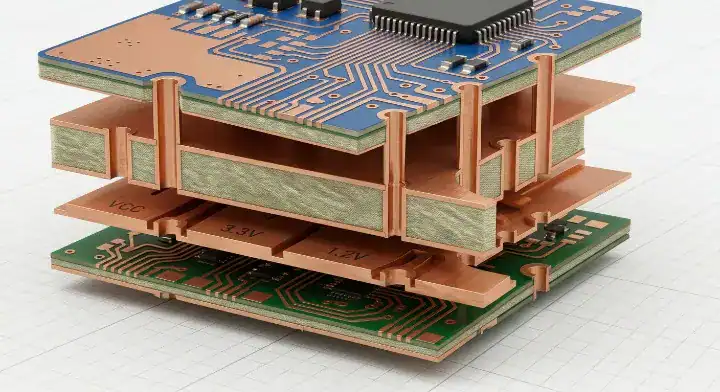
Upgrading to a 4-layer board with a dedicated solid ground plane is far cheaper than repeatedly failing $2,000 EMC certification tests because you tried to force a pcb copper pour to work on a 2-layer design. If your signals exceed 100MHz or you require strict impedance control, the 4-layer stackup is the only reliable engineering choice.
Many founders try to save $100 on their prototype batch by forcing a complex design onto a 2-layer board. They spend weeks meticulously tuning the copper pours, failing EMI testing, adding shielding cans, and failing again. Upgrading from a 2-layer to a standard 4-layer board generally adds 20% to 30% to the bare board fabrication price, but it instantly solves 90% of your EMC and signal integrity headaches by providing an unbroken reference plane. You can review the exact layer structures in our PCB stack-up design guide.
If your board has BGAs or fine-pitch components, the routing density alone forces you out of 2-layer territory. At that point, you need to evaluate standard multilayer vs high-density interconnects. Check our breakdown of HDI vs standard PCB cost to understand those pricing thresholds before committing to a 6-layer or 8-layer design.
| Your Design Profile | Recommended Approach | Factory Reasoning |
|---|---|---|
| Signal frequency < 50MHz, no EMC certs | 2-Layer + Good Copper Pour | Lowest cost approach; basic pour is sufficient. |
| Signal frequency 50–100MHz, no EMC certs | 2-Layer + Strict Via Rules | Stitching vias < 15mm; aggressively delete dead copper. |
| Signal frequency > 100MHz, strict EMC rules | Upgrade to 4-Layer | Solid ground plane is the only reliable EMC solution. |
| Mixed-signal (Analog + Digital) | Single Continuous Plane | Partition components physically; splitting planes causes huge loops. |
| BGA or fine-pitch high-speed chips | 4-Layer (Consider HDI) | Required for both signal integrity and physical escape routing. |
| High-voltage galvanic isolation | Split Plane Required | The rare exception where physical splitting is mandated for safety. |
| RF / Wireless module integration | 4-Layer + Strict Keep-Outs | RF traces require perfect plane continuity; clear out antenna zones. |
Not sure whether your design needs a 2-layer or 4-layer stackup for your EMC requirements? Send us your signal frequency range and we will recommend the most cost-effective approach based on our multilayer PCB manufacturing capabilities. Upload your Gerbers for a free DFM check — we review copper pour continuity and flag floating copper islands and stitching via gaps before production starts.
Frequently Asked Questions
1 . Can copper pour replace my decoupling capacitors? No, it cannot. While a tightly stitched copper pour does add a tiny amount of planar capacitance that helps filter noise in the high gigahertz range, it is completely ineffective for standard decoupling. You must still place 0.1µF and 1µF ceramic decoupling capacitors as physically close to the IC power pins as possible to handle instantaneous current spikes.
2. How do I find dead copper islands in my PCB layout tool? You should enable the “Remove Dead Copper” or “Remove Unconnected Copper” checkbox in your polygon pour settings. To manually audit the board, turn off all signal layers and only view the polygon layer. Any patch of copper that does not contain a drill hit (a via) connecting it to the GND net is a dead island and must be deleted.
3. Should I use hatched copper pour or solid copper pour? Always use solid copper pour for rigid PCBs. Hatched (grid) copper pour was historically used on flexible PCBs to maintain physical flexibility and prevent the copper from cracking when bent. On rigid FR4 boards, hatched copper introduces massive impedance discontinuities and increases trace inductance. Use solid copper pours exclusively for rigid designs.
Written by the QueenEMS Engineering Team. Ready to build your next board with a 99.7% first-pass yield rate? Contact us today to get your free quote.