
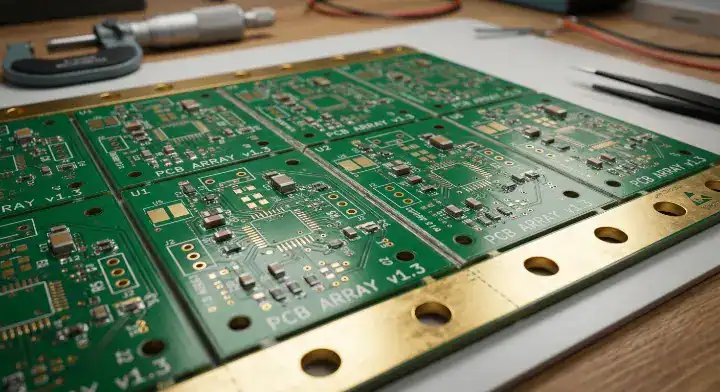
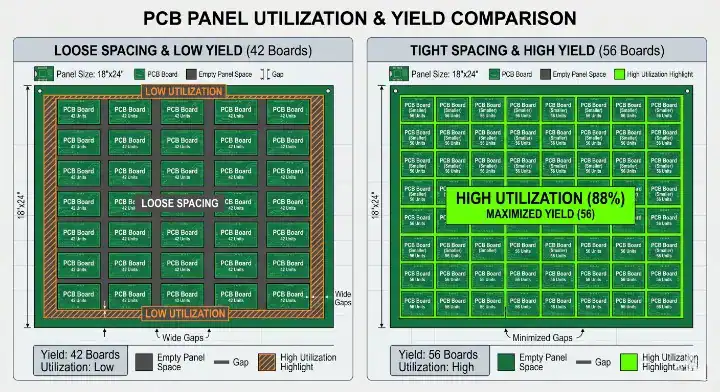
Quick answer: PCB panel costs go down when the panel fits more usable boards without creating assembly, inspection, or depaneling risk. The lowest quote is not always the densest panel. A cost-safe panel balances material utilization, rails, fiducials, tooling holes, V-score or tab-routing choice, component keep-out zones, and the files your supplier needs to optimize the array before CAM release.
Key takeaways:
- Panel utilization matters, but unusable edges, rails, router paths, X-outs, and depaneling stress can erase the saving.
- V-score is usually best for straight rectangular boards; tab routing is safer for irregular outlines, edge connectors, and mixed shapes.
- Family panels can reduce prototype setup cost, but they can waste material when each design needs a different production quantity.
- The fastest way to reduce avoidable charges is to send complete Gerbers, drill files, board outline data, BOM, pick-and-place files, and panel preferences before quote review.
A lower panel quote helps only if the same array can be fabricated, assembled, inspected, and separated without extra handling or avoidable scrap. Compare suppliers using the same board revision, panel drawing, order quantity, X-out rule, and separation method; otherwise a lower line price may reflect a different scope.
What drives PCB panel costs?
PCB panel costs are driven by the number of good boards that can be produced, assembled, inspected, and separated from each manufacturing panel. Material area is only one part of the equation. A panel that looks efficient in CAD can still cost more if it needs extra routing time, special depaneling, wider keep-out zones, extra handling, or a new stencil.
| Cost driver | Why it changes the quote | Buyer check before RFQ |
|---|---|---|
| Boards per panel | More good units per panel usually lowers material and handling cost per board. | Ask whether the proposed array improves usable yield, not just total board count. |
| Panel rails | Rails consume space but make SMT conveyor handling, fiducials, and tooling more reliable. | Confirm rail width, tooling holes, and fiducials with the assembly partner. |
| Separation method | V-score, tab routing, router depaneling, and laser depaneling have different machine time and stress profiles. | Match the method to board shape, component placement, and edge-quality requirements. |
| Stencil and setup | A different panel can require a different stencil, fixture, or program. | Do not compare quotes unless the panel drawing and assembly assumptions are the same. |
| X-outs and scrap rules | No-X-out requirements can increase bare-board cost because one bad sub-board may reject a whole panel. | Decide whether X-outs are acceptable for prototypes, pilots, or production. |
For early prototypes, the cheapest-looking option may be the one that avoids custom handling and lets your supplier use a familiar production panel. For repeat production, the better option is usually the one that improves repeatable yield, shortens handling time, and prevents damage during depaneling.

Why panel utilization alone can mislead you
A high-density array can reduce waste when every board is easy to assemble and separate. It can also create extra cost when the design ignores rails, fiducial placement, router bit clearance, component keep-out zones, or inspection access. That is why a panel should be reviewed by fabrication and assembly together, not only by bare-board area usage.
Use this simple decision rule: if a panel saves material but adds assembly risk, the saving is fragile. If a panel saves material while keeping SMT handling, AOI, test access, and depaneling stable, the saving is more likely to survive production.
- Good density: more usable boards per panel with stable rails, clear fiducials, and a safe separation path.
- Bad density: squeezed outlines, weak tabs, missing keep-outs, edge components near stress points, or mixed designs with unequal demand.
- Quote risk: two suppliers may price the same PCB differently because they assume different panel sizes, tooling, X-out rules, or depaneling methods.
When V-score lowers PCB panel costs
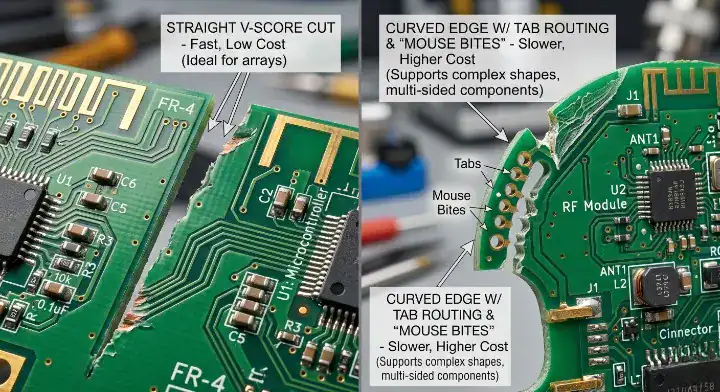
V-score is usually the lower-cost option when the PCB is rectangular and the separation lines can run straight across the panel. It reduces CNC routing time and keeps the layout simple. It works best when components, copper, and mechanical features stay clear of the score line and the final product can accept a straight scored edge.
Do not choose V-score only because it appears cheaper. If the board has curved edges, notches, overhanging connectors, or sensitive parts close to the outline, a forced V-score can create cracked components, rough edges, or redesign work. In that case, the cheaper method becomes expensive later.
Use V-score when the board shape is simple
- The board outline is square or rectangular.
- Score lines can run continuously across the panel.
- Components and copper have enough clearance from the separation line.
- The product does not require a fully routed cosmetic edge on every side.
When tab routing is worth the extra cost
Tab routing uses a routed outline and small breakaway tabs to hold each board in the panel. It normally takes more machine time and uses more spacing than V-score, but it can be the correct cost decision when the PCB has a complex outline or edge-mounted features.
Choose tab routing when the board has curved edges, cutouts, connectors extending beyond the outline, mixed straight and curved sides, or components that need better stress control during separation. Mouse bites can leave small break points that may need sanding or review if the final enclosure requires a clean cosmetic edge.
| Design condition | Usually better method | Cost logic |
|---|---|---|
| Simple rectangle | V-score | Lower routing time and simpler array. |
| Round or irregular board | Tab routing | Protects outline accuracy and edge features. |
| Connector overhang | Tab routing or hybrid panel | Prevents forced straight cuts through mechanical features. |
| High cosmetic edge requirement | Routed edge with planned tab cleanup | Avoids uncontrolled break marks on visible edges. |
| Very dense edge components | Router or laser review | Reduces depaneling stress compared with hand snapping. |
How rails, fiducials, and tooling holes affect the quote
Rails, fiducials, and tooling holes may look like wasted space, but they help the panel survive automated assembly. SMT conveyors need stable edges. Printers, pick-and-place machines, and AOI systems need repeatable alignment. If these features are missing, the supplier may add them during CAM review, which can change both the panel size and the final cost.
The safest RFQ approach is to show your preferred array and also allow the supplier to adjust rails and fiducials for their line. If you lock the panel too early, you may optimize for the wrong equipment. If you give no panel guidance at all, two quotes may be based on two completely different assumptions.
- Confirm whether rails are required for SMT conveyor handling.
- Place global fiducials where the assembly camera can see them clearly.
- Keep tooling holes outside the finished board area unless the product design requires them.
- Document V-score lines, routed paths, and tab locations in the fabrication notes.
Should different PCB designs share one family panel?
A family panel places two or more different PCB designs on one manufacturing panel. It can reduce setup effort for prototypes or engineering builds when the boards share the same stackup, copper weight, surface finish, thickness, and delivery schedule. It becomes risky when the designs need different quantities or have different assembly constraints.
For example, a family panel may be reasonable for a sensor board and a small adapter board during EVT. It may be a poor choice for production if you need 1,000 sensor boards and only 100 adapter boards. The panel will force the wrong quantity relationship, and the unused boards become hidden scrap.
Before approving a family panel, ask three questions: Are the fabrication specifications identical? Are the assembly processes compatible? Do the required quantities stay balanced across the build? If any answer is no, separate panels usually give a cleaner cost picture. For a mixed-design request, use the multi-design PCB panel RFQ guide to document which boards may share a build.
What files help suppliers reduce PCB panel costs?
Many avoidable panel charges happen because the quote team has to guess. A complete RFQ package lets the supplier check the panel before production and recommend changes while they are still cheap to make.
- Gerber or ODB++ fabrication data.
- Drill files and board outline layer.
- Assembly drawing, BOM, and pick-and-place file for PCBA work.
- Preferred panel array, if you already have one.
- Known enclosure-edge or cosmetic-edge requirements.
- Allowed or forbidden X-out policy.
- Target quantity for prototype, pilot, and production stages.
If you are not sure whether the panel is ready, ask for a DFM review before locking the purchase order. QueenEMS can review the panelization assumptions together with the fabrication and assembly files, so the quote reflects the build you actually intend to run.
How to compare two PCB panel cost quotes
Do not compare only the final unit price. A quote with a lower unit price may assume a risky panel, missing rails, no fixture requirement, different X-out rules, or a separation method that your product cannot accept. Ask each supplier to expose the assumptions behind the panel.
| Quote item | Question to ask | Why it matters |
|---|---|---|
| Panel size and array | How many good boards are expected per panel? | Shows whether cost is based on usable yield. |
| Separation method | Is this V-score, tab routing, router, laser, or hybrid? | Changes machine time, edge quality, and stress risk. |
| Rails and fiducials | Are SMT rails and global fiducials included? | Prevents surprise CAM changes before assembly. |
| X-out policy | Are X-out panels allowed? | Affects bare-board yield and acceptance cost. |
| Stencil and fixtures | Does this panel require new tooling? | Separates one-time setup cost from repeat cost. |
For repeat orders, save the approved panel drawing, revision, and assembly assumptions. A small undocumented change can create a new stencil or a new machine program even when the PCB schematic did not change.
Practical checklist before you submit the panel for quote
- Confirm the finished board outline and any edge connector constraints.
- Decide whether V-score, tab routing, or a hybrid method fits the shape.
- Check component clearance near score lines, tabs, and routed edges.
- Reserve space for rails, fiducials, and tooling holes if the SMT line needs them.
- State whether X-out panels are allowed for this build stage.
- Send complete fabrication and assembly files, not only Gerbers.
- Ask the supplier whether a small outline or array change would improve usable yield.
- Keep the approved panel drawing with the revision package for the next order.
The goal is not to make the densest possible panel. The goal is to make the lowest-risk panel that produces the required number of good boards with predictable fabrication, SMT assembly, inspection, and separation.
FAQ about PCB panel costs
What is the fastest way to reduce PCB panel costs?
The fastest way is to improve usable panel yield while keeping the panel safe for assembly and depaneling. Ask your supplier to review board spacing, rails, fiducials, and separation method before CAM release.
Is V-score always cheaper than tab routing?
No. V-score is often cheaper for straight rectangular boards, but it can be the wrong choice for irregular outlines, overhanging connectors, or sensitive edge components. A bad V-score decision can create scrap, rework, or field risk.
Do rails increase or reduce PCB panel costs?
Rails consume panel space, so they can raise material use. But they may reduce total cost by making SMT handling, alignment, and inspection more stable. For assembled boards, rail decisions should be made with the assembly process in mind.
Should I send my own panel drawing?
Yes, if you have one, but allow your supplier to review it. Your panel drawing helps communicate intent; the supplier’s CAM and assembly review confirms whether it fits their actual process.
Can QueenEMS help review PCB panel costs before production?
Yes. Send the Gerbers, drill files, BOM, pick-and-place file, target quantity, and any preferred panel drawing. QueenEMS can check whether the panel assumptions match fabrication, SMT assembly, inspection, and depaneling requirements before the order moves into production.
Written by the QueenEMS Engineering Team
Upload your files today · Free DFM check before production · Ship worldwide
Get your PCB prototypes in as fast as 24 hours. We handle FR4, Rogers, and hybrid boards up to 40 layers in volume production, with advanced builds subject to engineering review — free prototypes for 2–4 layer FR-4 boards, no minimum order.
Just upload your Gerber + BOM — we source every part, assemble, and inspect (AOI + X‑Ray) so you don't have to chase suppliers. Boards ship in as fast as 24 hours.