
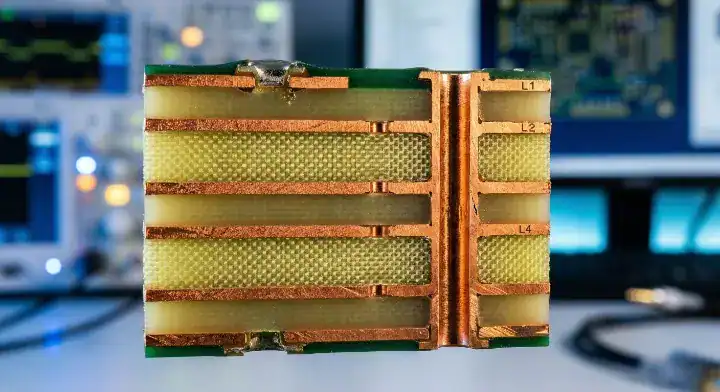
Quick Answer: A reliable pcb stack-up design requires matching your calculated trace widths and prepreg thicknesses with your manufacturer’s actual material inventory to hit a standard ±10% impedance tolerance. For a typical 6-layer board, using 370HR FR4 with a core thickness of 0.008″ and 1080 prepreg yields the most stable 50-ohm single-ended impedance while keeping prototype fabrication costs under $50 per board. Key takeaways:
- Standard material availability dictates 80% of actual impedance results on the factory floor.
- Moving from a 4-layer to a 6-layer board increases raw fabrication cost by 30% to 45%.
- Specifying a tighter ±5% impedance tolerance adds a 15% to 20% premium to your board price.
- Dk (Dielectric Constant) values shift by up to 0.2 depending on the specific glass-to-resin ratio of the prepreg.
Table of Contents
- Why Does Your PCB Stack-Up Design Fail in Manufacturing?
- How Do You Choose the Right Materials for Your Stack-Up?
- What Is the Cost Difference Between 4-Layer and 6-Layer Stack-Ups?
- How Do You Calculate and Control Impedance Accurately?
- What Are the Most Common PCB Stack-Up Design Mistakes?
- How Do You Communicate Stack-Up Rules to the Fab?
- FAQ
You run your trace geometry through a simulation tool, define your dielectric constant, and send the files out expecting perfect signal integrity. Then the boards arrive, your high-speed signals reflect badly, and the fab house admits they swapped your specified prepreg for what they had in stock. After processing over 3,200 complex multi-layer orders last year, we see this exact disconnect between engineering math and factory floor realities every single week. This pcb stack-up design overview breaks down how to align your theoretical numbers with actual lamination constraints so you stop wasting money on failed board spins.
Why Does Your PCB Stack-Up Design Fail in Manufacturing?
Your pcb stack-up design fails because theoretical calculator values for prepreg thicknesses rarely match the pressed, finished thickness of actual factory materials, causing impedance deviations of 15% to 25%. A 4.0 mil prepreg might compress down to 3.2 mils after the heavy lamination press cycles melt the resin into the adjacent copper traces.
Here’s where it gets real…
Hardware forums are filled with engineers baffled when their 50-ohm traces measure 65 ohms upon arrival. What actually happens? You run your numbers using a generic 4.0 mil dielectric thickness, but the factory substitutes your specified 1080 prepreg with a thicker 2116 style just to meet the overall 1.6mm board spec. This unapproved material swap instantly throws off your characteristic impedance.
- Resin starvation happens when high copper-weight inner layers lack enough prepreg resin to fill the gaps.
- Asymmetrical layer arrangements cause severe board warpage during the hot assembly reflow process.
- The Dk value fluctuates by up to 0.2 simply based on the specific glass-to-resin ratio of the prepreg used.
How Do You Choose the Right Materials for Your Stack-Up?
Choosing the right materials requires balancing electrical performance with standard factory stock, typically defaulting to high-Tg FR4 like Isola 370HR for digital boards, which costs 10-15% more than standard FR4 but easily survives multiple lead-free assembly cycles. For frequencies extending above 3GHz, shifting to a material like Rogers RO4350B doubles your raw material costs but cuts dielectric loss by over 50%.
But here’s what most guides won’t tell you…
Not all FR4 performs the same in the pressing machine. Specifying a generic “FR4” on your fabrication drawing leaves the factory guessing, usually resulting in the cheapest available option. You need to define the exact Tg, Td, and specific resin system if your hardware faces strict thermal or high-speed data requirements.
| Material Type | Typical Dk (@1GHz) | Df (Loss Tangent) | Best Application | Cost Premium |
|---|---|---|---|---|
| Standard FR4 (Tg 130) | 4.3 – 4.5 | 0.020 | Simple logic, power boards | Baseline ($) |
| High-Tg FR4 (Tg 170) | 4.2 – 4.4 | 0.018 | Server boards, multi-reflow | +10% to 15% |
| Rogers RO4350B | 3.48 | 0.0037 | RF antennas, radar modules | +100% to 150% |
| Panasonic Megtron 6 | 3.4 – 3.7 | 0.002 | 100G/400G switches, high-speed | +150% to 200% |
Need help matching your high-speed signals to the right laminate? Upload your BOM and Gerbers for a free DFM/DFA engineering review on every order.
What Is the Cost Difference Between 4-Layer and 6-Layer Stack-Ups?
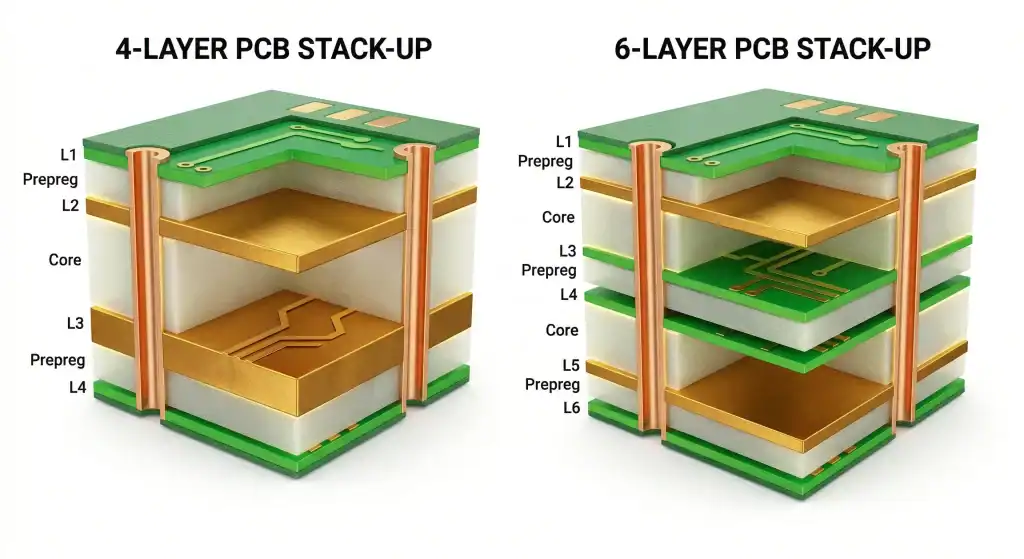
Upgrading your board from 4 layers to 6 layers usually increases your bare fabrication cost by 30% to 45% due to the extra lamination cycle and additional core material handling. For a standard batch of 100 boards measuring 100x100mm, a 4-layer might cost $2.50 per unit, while the 6-layer equivalent jumps to roughly $3.50.
So what does this actually mean for your budget?
Engineers often post on Reddit trying to squeeze DDR3 or GMSL2 interfaces onto 4-layer boards to save money. Yet, routing these high-speed signals without adjacent solid ground planes destroys your return paths. Upgrading to a 6-layer stack-up gives you dedicated Signal/GND/Signal/Signal/GND/Signal layers, dropping your EMI emissions instantly.
- 80% of hardware startups submit 4-layer designs with 0.1mm trace/space routing to save dollars, creating massive crosstalk and failing EMI tests.
- We actively flag these tight 4-layer designs during quotation, providing a cost-benefit breakdown of moving to 6 layers.
- Shifting dense designs to a relaxed 6-layer stack-up reduces customer debug time by weeks and helps maintain our 99.7% first-pass yield rate.
How Do You Calculate and Control Impedance Accurately?
You control impedance by calculating trace width and spacing against the manufacturer’s specific dielectric thickness table, targeting a standard ±10% tolerance which safely covers 95% of USB, HDMI, and PCIe interfaces. Pushing your factory for a tighter ±5% tolerance requires custom material pressing and line-width compensation, adding a flat 20% premium to your unit price.
Now, here’s the part that surprises most customers…
A major trap discussed constantly on StackExchange involves switching reference planes. If your high-speed signal drops from Layer 1 to Layer 6, its reference plane changes from the Top GND to the Bottom GND. Without adding a ground stitching via right next to your signal via, the return current path is broken, creating massive impedance discontinuities.
- Single-ended 50 ohm: mostly used for RF antennas and basic clock signals.
- Differential 90 ohm: standard requirement for USB data interfaces.
- Differential 100 ohm: standard requirement for Ethernet and HDMI links.
What Are the Most Common PCB Stack-Up Design Mistakes?
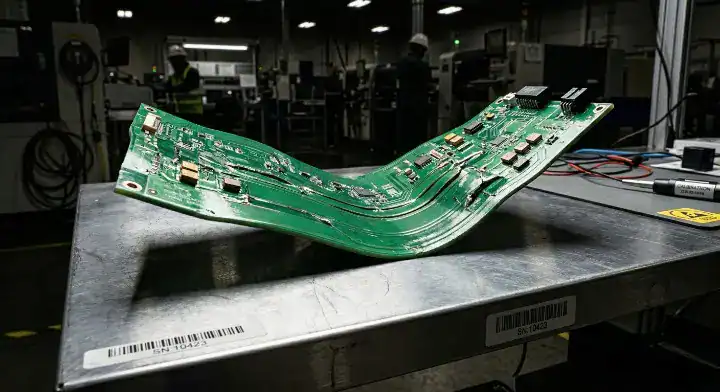
The most frequent pcb stack-up design mistake is creating an asymmetrical board, where differing copper weights or uneven dielectric thicknesses from the center axis cause up to 15mm of physical warpage during the reflow process. Another critical error involves specifying unstocked, odd-value prepreg thicknesses, delaying your production by 7 to 14 days while the purchasing team hunts down the niche material.
Want the honest answer?
For simple 2-layer boards under 10 pcs with absolutely no BGA components, a budget pool-service like JLCPCB is honestly more cost-effective for your wallet. But if you are routing controlled impedance lines across 8 layers for an industrial application, you absolutely cannot guess the stack materials.
| Red Flag (Bad Design) | Green Flag (Good Design) | Impact on Production |
|---|---|---|
| 1oz copper on top, 2oz on bottom | 1oz copper on both outer layers | Prevents potato-chip warpage |
| Specifying “Any FR4” | Specifying “Isola 370HR or equivalent” | Guarantees thermal reliability |
| Unbalanced prepreg layers | Mirrored prepreg layers from the center | Stops bowing during SMT heating |
| Placing high-speed traces on outer layers | Routing high-speed traces between solid ground planes | Kills EMI radiation immediately |
If you have a complex BGA assembly on an asymmetrical board, it will warp and shear the solder balls right off. We run 3D AOI + X-Ray inspection on every BGA joint to catch these exact mechanical stresses early.
How Do You Communicate Stack-Up Rules to the Fab?
You communicate your stack-up rules by embedding a clear fabrication drawing directly in your Gerber files, detailing the exact layer order, copper weights, target impedance values, and reference planes. Sending a separate, vague PDF document in an email often leads to version control chaos and a 3-day delay during the engineering query (EQ) phase.
The real question is…
Do not just write “50 ohms” in the notes and expect magic. Tell the factory exactly which traces need it, provide your calculated trace width and spacing, and clearly state the layer they reside on. We run these specific parameters through our Polar Instruments software and send you the adjusted, factory-ready stack-up for final approval.
If you are a new customer looking to test a design without massive financial risk, we offer free 2-4 layer FR4 prototypes so you can verify our material performance firsthand. You can learn more about standard documentation formats in our gerber file overview.
FAQ
Can I use different copper weights on outer and inner layers? Yes, you can, and it is a standard industry practice. Outer layers typically start at 0.5oz and plate up to 1oz during the via plating process, while inner layers often stay at a solid 1oz or 2oz for heavy power distribution. Upload your BOM and Gerbers today to let our team verify your copper distribution.
What is the best way to prevent PCB warpage in my stack-up? It depends heavily on structural symmetry. You must keep your copper area distribution and dielectric thicknesses perfectly symmetrical around the central core axis of the board. Get a free quote on our website and our engineering team will run a mechanical symmetry check.
How do I know if I need a 4-layer or 6-layer board? It depends on your trace routing density and signal return paths. If you cannot cleanly route your data lines without slicing up your continuous ground plane, you must move to 6 layers to maintain your signal integrity. Request a free first-article inspection on your first order and let us evaluate your layer count.
Written by the QueenEMS Engineering Team. Ready to build your next board? Contact us today at QueenEMS.